Building a Modern Micro-Frontend Architecture on Top of Legacy Systems
Before building a micro-frontend architecture, I used to think the main challenge would be splitting pages into smaller applications. After working inside a large portal shaped by years of legacy code, new React modules, global utilities, old loaders, and several backend integration styles, the problem felt less like “splitting pages” and more like building a safe migration path through a mountain.
The real question was not: how do we rewrite everything into a modern stack?
The real question was: how do we create a modern frontend platform while old pages, old URLs, old global objects, old permissions, and old integration points continue to work?
This article summarizes one practical approach: using a micro-frontend shell as the new composition layer, exposing business domains as remotes, and building compatibility adapters so legacy pages can gradually consume the new system without forcing a full rewrite.
Context: a frontend that grew in layers
In many long-lived enterprise applications, the frontend is not one application. It is a timeline.
The oldest layer may be a server-backed portal with static assets, jQuery utilities, a legacy module loader, Backbone-style views, and global request helpers. Later, React islands are added into existing DOM containers. Then remote manifest loading appears, allowing selected React components to be loaded from external bundles. Eventually, a modern micro-frontend shell is introduced, using Webpack 5 Module Federation to load independently deployed domain modules at runtime.
None of these layers fully disappear on day one. They overlap. That overlap is where most of the real engineering work lives. A clean architecture diagram may show one shell and several remotes, but production reality often includes multiple module systems, routing models, and request wrappers running side by side.
Goal
The goal of the architecture was not to make the codebase look modern from the outside. The goal was to establish a new default path for future development while preserving existing behavior.
That means the new architecture needed four parts: a shell that owns bootstrapping, global context, routing, permissions, feature flags, and runtime loading; domain remotes that expose routes, menus, components, and utility modules; shared runtime capabilities such as request handling, localization, user context, and common UI packages; and legacy bridges that allow old pages to load new modules through existing entry points.
The last point is easy to underestimate. Without compatibility bridges, every legacy page becomes a blocker. With bridges, migration can happen feature by feature.
Architecture overview
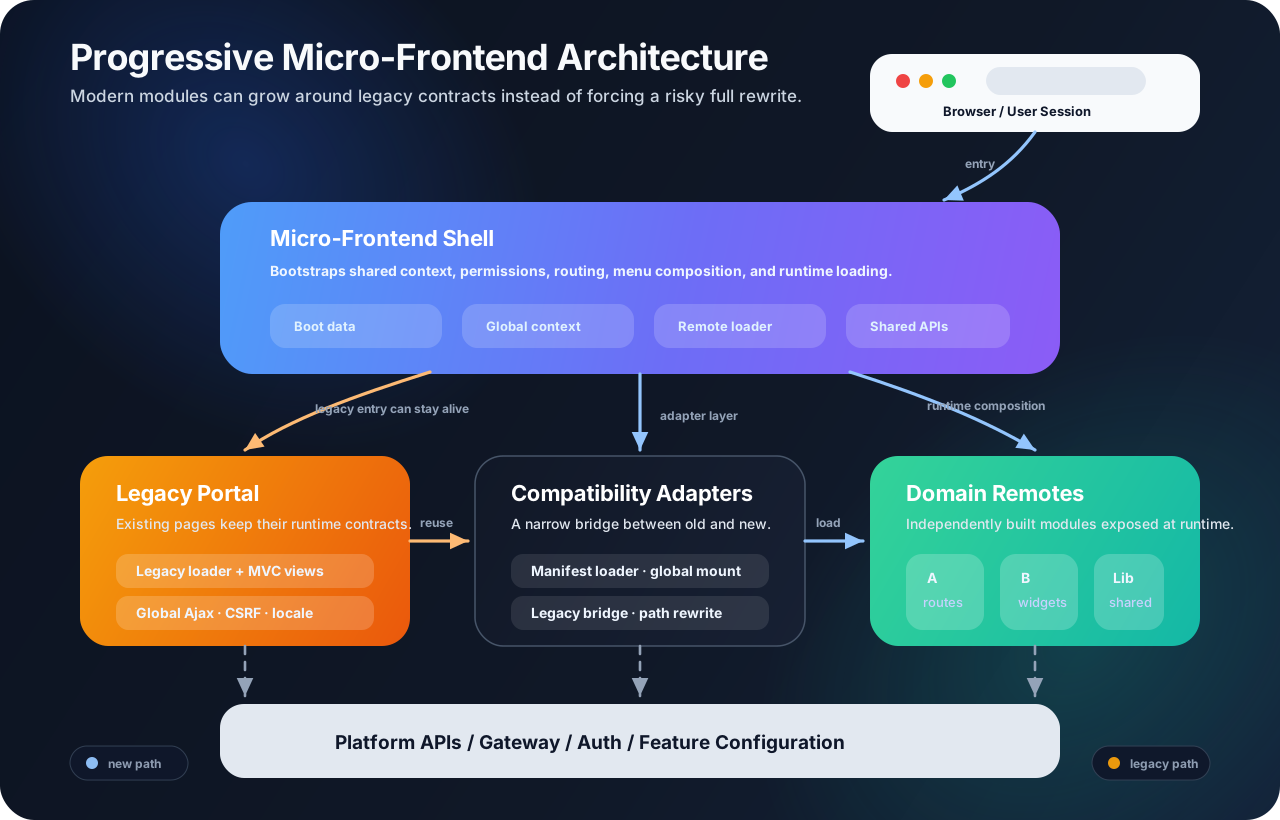
At the center is the micro-frontend shell. It bootstraps the application before rendering the actual UI. During startup, it fetches global data such as user information, organization context, permissions, feature flags, product configuration, and menu definitions. This data is placed into a shared global provider so remote modules do not need to independently rebuild the same infrastructure.
The shell also owns route and menu composition. Instead of hardcoding every page in the shell repository, each domain remote can expose a menu configuration and a route module. The shell loads these modules dynamically, filters them based on permissions and flags, and contributes them to the final navigation structure.
This turns the shell into a platform boundary. It does not need to know the internal implementation of every domain. It only needs to know how to locate the remote entry, initialize the shared scope, and request the exposed module.
Runtime loading with Module Federation
The most important runtime mechanism is dynamic remote loading.
shell asks for "domain/menuConfigs"
  -> resolve domain name to remote entry URL
  -> inject remoteEntry.js
  -> initialize shared dependency scope
  -> get exposed module from the remote container
  -> render returned routes, menus, or components
This is different from a traditional monolithic build. The shell and the domain remote can be built separately. The shell does not need the remote’s source code at build time. It only depends on the runtime contract: remote name, remote entry URL, exposed module path, and shared dependencies.
That contract is powerful, but it needs discipline. Shared dependencies such as React, UI libraries, localization utilities, and global context packages should be centrally managed. Otherwise, each remote may bring its own duplicate runtime, creating larger bundles or subtle bugs when multiple React instances or incompatible shared packages are loaded on the same page.
The shell owns cross-cutting concerns
One mistake in micro-frontend projects is allowing every remote to become a mini-application with its own authentication logic, permission fetching, API client, locale setup, and error handling. That creates independence on paper, but duplication in practice.
A better approach is to let the shell own cross-cutting concerns. The shell fetches the boot data once, creates a request wrapper with required headers and common error handling, initializes localization and date/time utilities, exposes permission and feature-flag state, and provides a common global context that remotes can consume.
This keeps domain remotes focused on business UI and domain-specific state. They still own their screens, workflows, and API modules, but they do not need to rediscover who the user is, which organization is active, or how global alerts should be displayed.
Domain remotes as capability packages
A useful mental model is to treat each remote not as a complete SPA, but as a capability package.
A domain remote may expose menu configuration, route configuration, page components, reusable widgets, search components, integration modules for legacy pages, version metadata, and domain-specific providers.
This model is especially useful during migration. A remote can serve the new shell and the legacy portal at the same time. The new shell may load its route module. A legacy page may load one exposed widget. Another old module may use a bridge function to resolve static asset paths or localization messages.
In other words, the remote is not only a page. It is a runtime boundary for a domain.
Compatibility with legacy pages
The most interesting part of this architecture is the legacy bridge.
The old portal already has its own assumptions: static asset paths, a legacy module loader, global AJAX helpers, global session variables, global CSRF tokens, and existing URL patterns. Rewriting all pages before introducing micro frontends would be unrealistic.
Instead, the compatibility layer intercepts selected legacy loading paths and redirects them to the new runtime when possible. For example, an old page may still call a legacy module path. The loader can detect that the path belongs to a migrated domain, call the micro-frontend runtime, load a bridge module from the corresponding remote, and let that bridge decide whether to resolve the request to a new remote asset or fall back to the original static asset.
This gives the team a controlled migration switch. The old call site can remain stable, while the implementation behind it moves gradually. Intermediate patterns, such as remote manifest loading and global mount functions, should also be documented rather than ignored. They explain why certain pages behave differently from the modern shell path.
API boundaries and version compatibility
Frontend migration often mirrors backend migration. A domain remote may still call legacy endpoints for some workflows while using newer service or proxy endpoints for others. That is normal during a transition.
The key is to make the boundary explicit. The shell should provide the request foundation, but domain remotes should keep their domain API modules close to their own code. When a domain begins depending on a newer backend service, that dependency should be visible in the remote’s API layer.
Version compatibility also matters. If a remote depends on backend behavior that varies by environment, tenant, or service version, the frontend loader may need a version mapping mechanism. In that model, the shell does not blindly load the latest remote. It resolves the correct remote version based on backend compatibility metadata.
This adds release complexity, but it prevents a worse problem: a new frontend silently loading against an incompatible backend.
Trade-offs
This architecture is not free. It introduces more runtime moving parts: remote entries, shared scopes, version maps, feature flags, and compatibility adapters. Debugging can be harder because one user flow may cross the shell, a remote, a legacy loader, and a backend proxy. Local development also needs good proxy configuration, otherwise engineers spend too much time reproducing production loading behavior.
The benefit is that migration becomes incremental. New domains can be built with a modern toolchain. Existing pages can keep running. Shared platform capabilities become more consistent. Teams can move one route, one component, or one integration point at a time.
For a small product, this would probably be over-engineering. For a large application with years of accumulated frontend layers, it can be a practical way to create forward motion without pretending the legacy system does not exist.
Conclusion
A successful micro-frontend migration is not only about Module Federation. Module Federation solves the runtime composition problem, but the broader architecture must also solve bootstrapping, shared context, permission-aware routing, dependency sharing, legacy interoperability, and version compatibility.
The most useful principle is to avoid treating legacy code as an enemy. Legacy code is part of the production contract. The job of the new architecture is to create a path where modern modules can grow around that contract, replace pieces of it over time, and eventually make the old paths less important.
That is the real value of a micro-frontend shell: it becomes the new center of gravity, while compatibility bridges keep the system stable during the long migration from old code to new code.
Comments